Free Image Background Remover
Remove backgrounds from images and pictures online for free. Create transparent PNGs or pure white backgrounds entirely in your browser with no limits.
About Free Online Background Remover
Automatically remove backgrounds from images, photos, and pictures online directly in your browser. Acting as a fast transparent background maker, our local AI accurately isolates subjects—whether portraits, product photos, logos, signatures, or illustrations—and exports crisp transparent PNGs. Switch to pure white backgrounds for e-commerce listings or add natural grounding drop shadows with one click. Processing is completely free with no limits or sign-up, running 100% locally on your device so your files are never uploaded to any server or used for AI training.
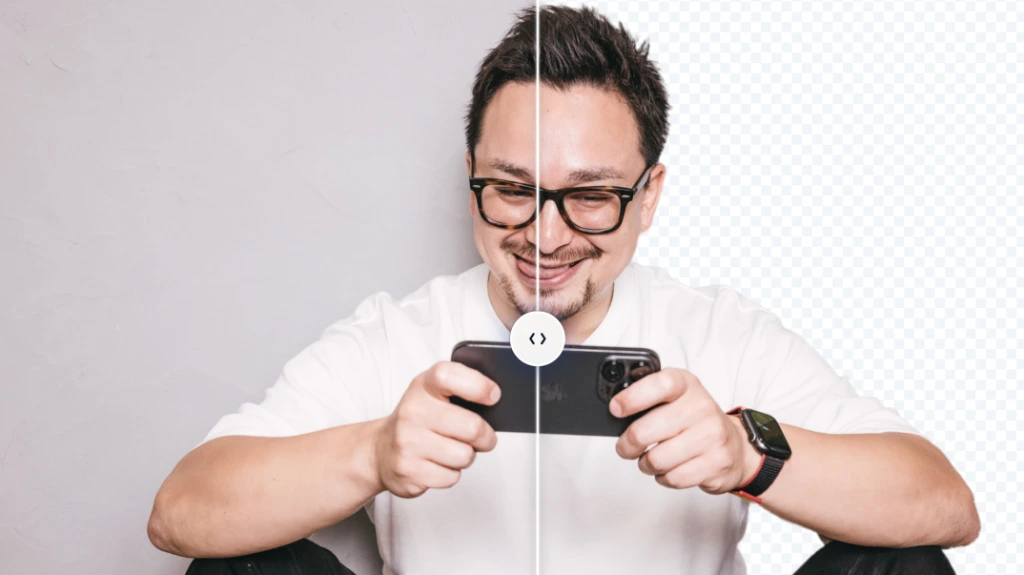
Load an Image
Drag and drop your image or picture into the workspace, click "Select Image", or paste directly from your clipboard (Ctrl+V / Cmd+V).
Select Background Mode & Shadow
Choose Transparent, White, Black, or Color from the toolbar. Click "Shadow" to add a realistic grounding shadow. Drag the slider to compare before and after.
Download or Copy
Click "Save (PNG)" to download the transparent PNG in its original resolution. Click "Copy" to place the cutout image onto your clipboard, ready to paste straight into PowerPoint, Google Slides, or graphic design tools.
100% In-Browser Privacy
Image processing executes locally in your browser via ONNX Runtime Web. Files are never uploaded to any remote server or used for AI training, keeping personal photos, artwork, and confidential business documents completely secure.
Unlimited Free & Original HD Resolution
Completely free with no usage limits, no login, and no watermarks. Export your transparent background images in crisp original resolution up to 4096px.
Product Photo White Backgrounds & Shadows
Convert product images to pure white backgrounds to meet e-commerce listing standards. Add natural grounding drop shadows with one click.
Precise Cutout Edges & Fine Details
Advanced in-browser AI segmentation and edge-refinement algorithms cleanly preserve fine hair, intricate boundaries, and interior gaps without color halos.
Clipboard Paste & Direct Copy for Faster Workflow
Paste copied screenshots and images directly without saving files first. Copy the transparent PNG straight to your clipboard for instant use in slides and design tools.
Switch Between Transparent, White, Black & Custom Colors
Switch between transparent, white, black, or custom colors with the built-in color picker. Check edge cutouts against contrast backgrounds or prepare icons and banners.
Avoiding Paywalls & Watermarks for HD Downloads
Many online background removers lock full-resolution HD exports behind paid subscriptions or add watermarks to free downloads. Here, you can export images in their original quality up to 4096px completely free with no usage limits.
Processing Photos Without Server Uploads
Cloud services upload your images to remote servers, raising privacy and AI training concerns for confidential documents, artwork, or personal photos. This tool runs entirely in your local browser, ensuring zero server data transfers.
Adding White Backgrounds & Shadows Without Extra Software
No need to open separate photo editing software just to add a white backdrop or draw grounding shadows after removing the background. Switch to a pure white background and add realistic drop shadows with a single click.
Will my images be used for AI training or sent to external servers?
Can I use the generated images commercially? Is attribution required?
Are there any usage limits or watermarks? Is it completely free?
Is there a file size or resolution limit? Will image quality degrade?
What file formats are supported? Why are images saved as PNG?
Open Source Software & Model Licenses
This tool performs client-side inference using the following open source software and machine learning models (including models converted and quantized to ONNX format for browser execution).
- ORMBG (1024x1024): Copyright © 2024 Christian Schirrmacher / ONNX Community (Apache-2.0 License)
- IS-Net / DIS & U2-Net (1024x1024 / 320x320): Copyright © 2020-2022 Xuebin Qin et al. (Apache-2.0 License)
- BlazeFace (Face Detection & Routing): Copyright © Google LLC / MediaPipe (Apache-2.0 License)
- ONNX Runtime Web: Copyright © Microsoft Corporation (MIT License)
- Vue.js: Copyright © 2018-present Yuxi (Evan) You (MIT License)
*All software and models are provided "AS IS", without warranty of any kind, express or implied. For notices and full license terms, please see THIRD-PARTY-LICENSES.txt (Full License Terms).