Convert Excel to HTML Table
Copy and paste your Excel table to convert it into clean HTML markup.
Convert Excel Tables to HTML Code
Turn Excel spreadsheets into clean HTML table code by pasting your data. The code generates in real time with a live preview. Supports thead/tbody tags and header cell settings.
Paste Your Excel Table
Copy your Excel table and paste it directly into the input form. Tab-separated text is also supported.
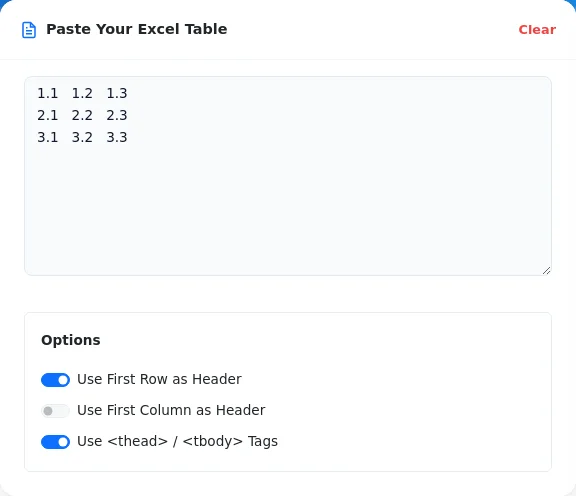
Configure Options
Use toggles to specify header rows, header columns, and semantic and
tags, adapting your spreadsheet structure for the web.
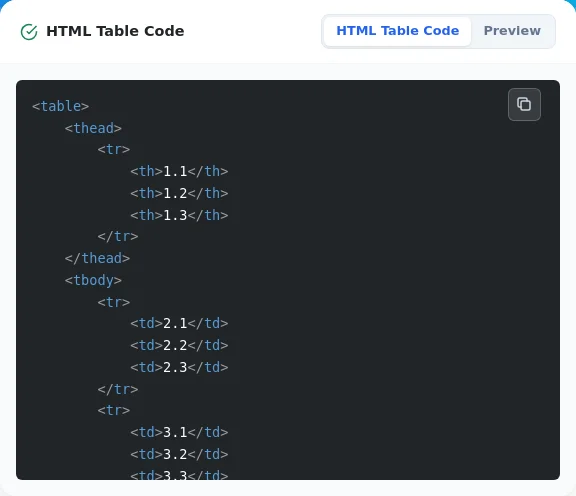
Copy the HTML Table
You can copy the converted HTML code or check the actual display using the preview feature.
Instant conversion of Excel tables to HTML
Real-time code preview
Option to set first row/column as headers
Toggle /
tag usageFree and no registration required, accessible to everyone
Convert Excel spreadsheets directly into web-ready HTML tables
Publish spreadsheet data to internal portals, documentation, and wikis
Embed clean, structured data tables into blog posts or articles
Speed up frontend development by skipping manual HTML table tagging
Can I use it with table data other than Excel?
Can I use the generated HTML code as is?
Is it available on smartphones?
Are table decorations also converted?
Do I always have to use <thead> and <tbody>?
Rewriting an Excel table into HTML by hand is slow and tedious. Paste your data here and get ready-to-use HTML table code right away.
Paste your Excel data and generate HTML table code now.