Generate HTML Tables in Real Time
Type data into a spreadsheet-like interface and get clean HTML table code generated in real time. Toggle thead/tbody tags and header cells with simple switches. Handy for web development and blog posts.
Follow these 3 simple steps to generate clean HTML table code in seconds.
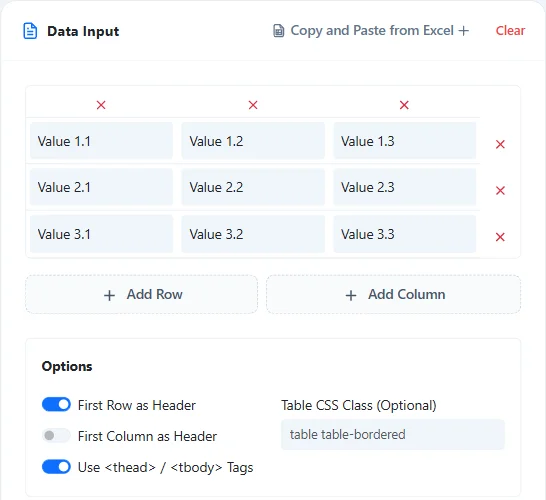
Enter Table Data and Add Rows/Columns
Enter your desired text into the spreadsheet-like cells. Use the "Add Row" and "Add Column" buttons, or delete buttons, to build a table of any size with ease.
Configure HTML Table Structure Options
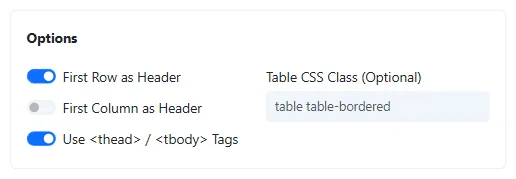
Define the HTML structure suited for your needs using the toggle switches in the "Options" section.
- First Row as Header: Wraps the top row with <th> tags.
- First Column as Header: Sets the leftmost cell of each row to a <th> tag.
- Use thead / tbody Tags: Structures the table with <thead> for the header and <tbody> for data, creating semantic code that simplifies CSS styling.
Review and Copy Code
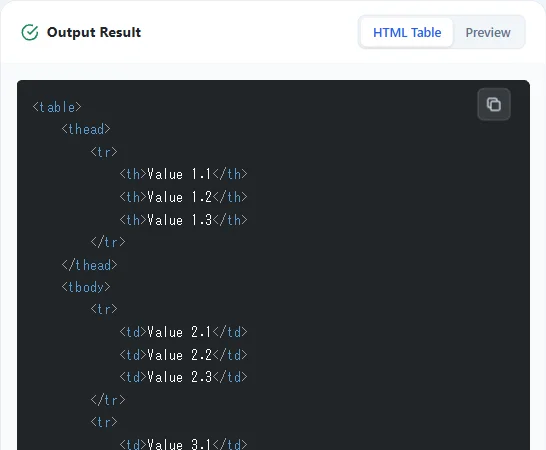
Check the table's appearance in the "Preview" area, and if everything looks good, copy the automatically generated code from the "HTML Table" area. Just press the "Copy" button to paste it directly into your web page, CMS (like WordPress), or editor.
* If you want to convert a large amount of existing Excel data directly to HTML, the Excel to HTML Table Converter is very useful.
Real-time Code Generation
Text input and option changes are reflected in the HTML code and preview in real time.
Intuitive Cell Manipulation
Add or delete rows and columns with a single button. Resize your table without manually editing tags.
Semantic HTML Structure
Supports switching between thead/tbody and th tags to output correct HTML that improves SEO and accessibility.
No Installation or Registration
Ready to use immediately in your browser without creating an account or going through tedious logins.
Secure Local Processing
Your input data is processed locally in your browser and never sent to a server, ensuring safety even for confidential data.
Web Designers & Coders
Skip manual tag typing and get structured table code in seconds.
Bloggers & Writers
Paste clean tables into WordPress or other CMS editors without fiddling with HTML.
HTML Beginners & Learners
See how table, tr, th, td, thead, and tbody tags work together through hands-on practice.
Internal System Administrators
Produce structured HTML tables for manuals, wikis, or internal portals without manual tag drafting.